Vouchers
Gift cards, ride bundles, or a voucher redeemable for a pass — issue one, print it, and track it to redemption.
ForAdminsInstructors
On this page
A voucher is something you sell now and someone redeems later — a gift card, a bundle of rides, or a voucher that turns into a full pass. Admins and instructors can issue and manage vouchers; it stays hidden from riders, who see their own vouchers in their wallet.
Vouchers don't have their own list page — they live together with passes in one merged list. Open Passes, then switch to the Vouchers tab (or All to see both).
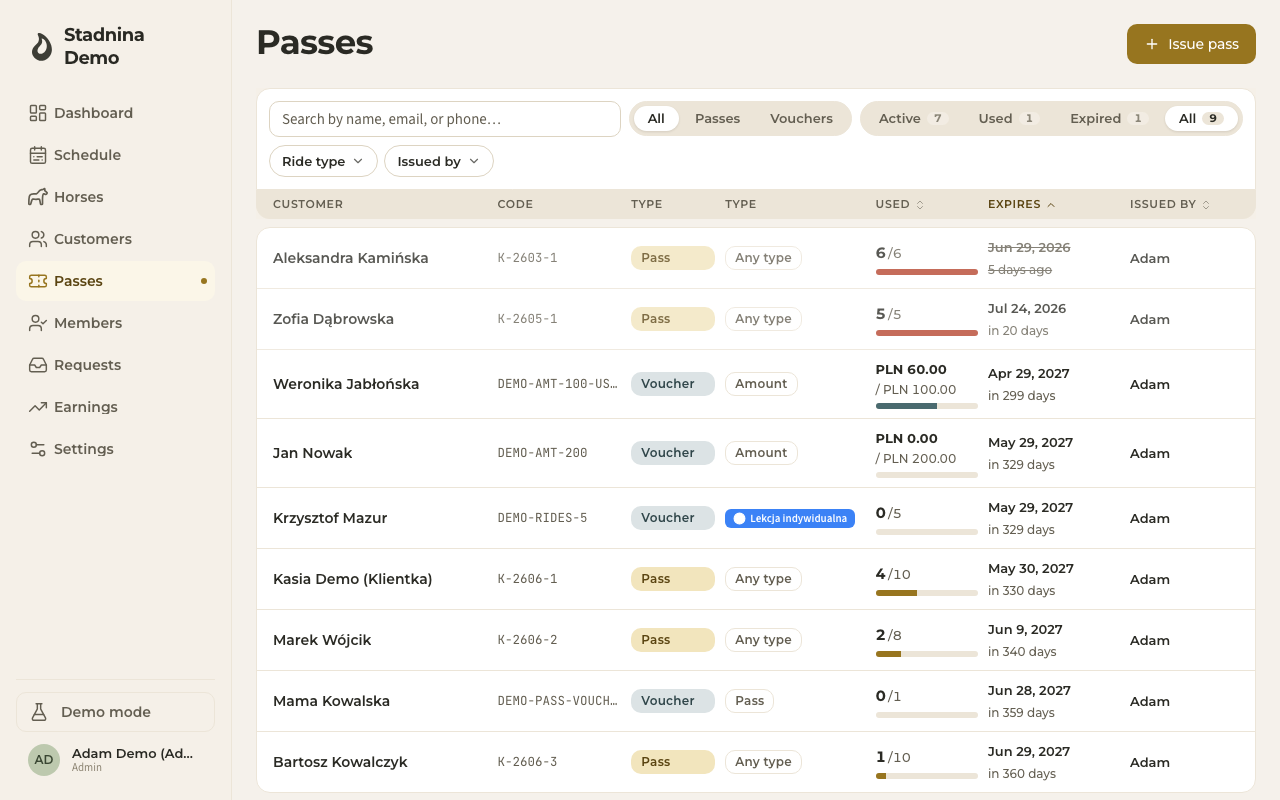
Reading a voucher row
Each voucher row shows:
- Customer — the recipient's name, or the voucher's display name if it hasn't been claimed by an account yet.
- Code — the voucher's short reference code.
- Type: Voucher — always shown as Voucher, next to a Kind chip:
- Amount — a money value that can be spent partially.
- Rides — a fixed number of rides of one ride type.
- Pass — converts into a full pass on redemption.
- A bar showing how much has been used — money spent for an Amount voucher, rides used for a Rides voucher.
- Expires and Issued by, same as a pass row.
Selling a voucher
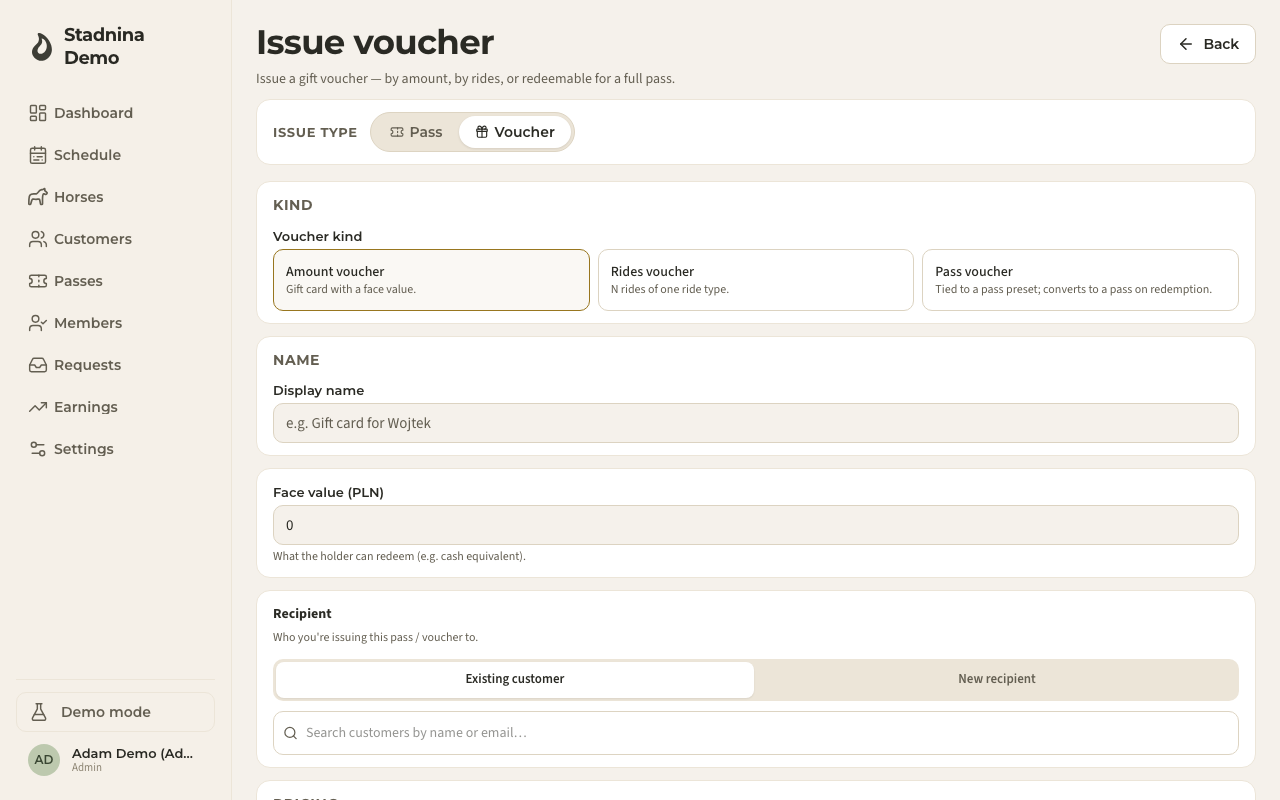
- From the Passes page, click Issue pass, then choose Voucher — or go straight to the voucher issue form.
- Pick the voucher kind: Amount voucher (a gift card with a face value), Rides voucher (N rides of one ride type), or Pass voucher (tied to a pass type; becomes a pass on redemption).
- Give it a display name — this is what shows on the printed voucher and in the list.
- Fill in the kind-specific fields:
- Amount: the face value.
- Rides: the ride count and the ride type.
- Pass: which pass type it converts to.
- Pick a recipient — an existing customer, or type a name for someone who hasn't signed up yet (the voucher links to their account automatically the first time they redeem it).
- Check the regular price, and add a discount if your stable allows custom voucher discounts.
- Set the sale date (up to 90 days in the past), how it was paid, and — if you're an admin — who sold it.
- Set Valid until, then click Issue voucher.
The voucher's own page
Every voucher also has its own page (open it by clicking its row, then Edit / print in the detail panel, or via its direct link). From there you can:
- Print the voucher.
- Edit it — name, recipient, validity, and (if your stable allows it) the amount or ride count.
- Convert to pass — for a Pass-kind voucher, this turns it into an actual pass right away; its validity starts from the moment of conversion. Depending on your stable's settings, the recipient may be able to do this themselves from their wallet.
- Cancel the voucher (admins only, and only while it has no redemptions yet).
Redeeming a voucher
A voucher is redeemed from the ride checkout screen, not from this page — a customer's active vouchers are offered when settling their seat on a ride, and if the voucher doesn't cover the full price, the rest is collected in cash. See Ride checkout for the full flow.
Good to know
- A Pass voucher's ride count, ride type, and validity are locked in (snapshotted) at the moment it's issued — changing the underlying pass type later doesn't change vouchers already sold.
- A voucher can only be cancelled before it has any redemptions.
- Whether instructors can issue vouchers, and whether custom voucher discounts are allowed, are set per stable — see Pass & voucher setup.
Related
- Passes — the merged list vouchers live in.
- Ride checkout — how a voucher actually pays for a ride.
- Pass & voucher setup — configure voucher rules and discounts.
- Earnings — how a voucher sale shows up in an instructor's settlement.
- Wallet & passes — what a rider sees.