Your dashboard
What you see when you open your stable — your next ride, your passes and balance, and what's coming up.
ForRiders
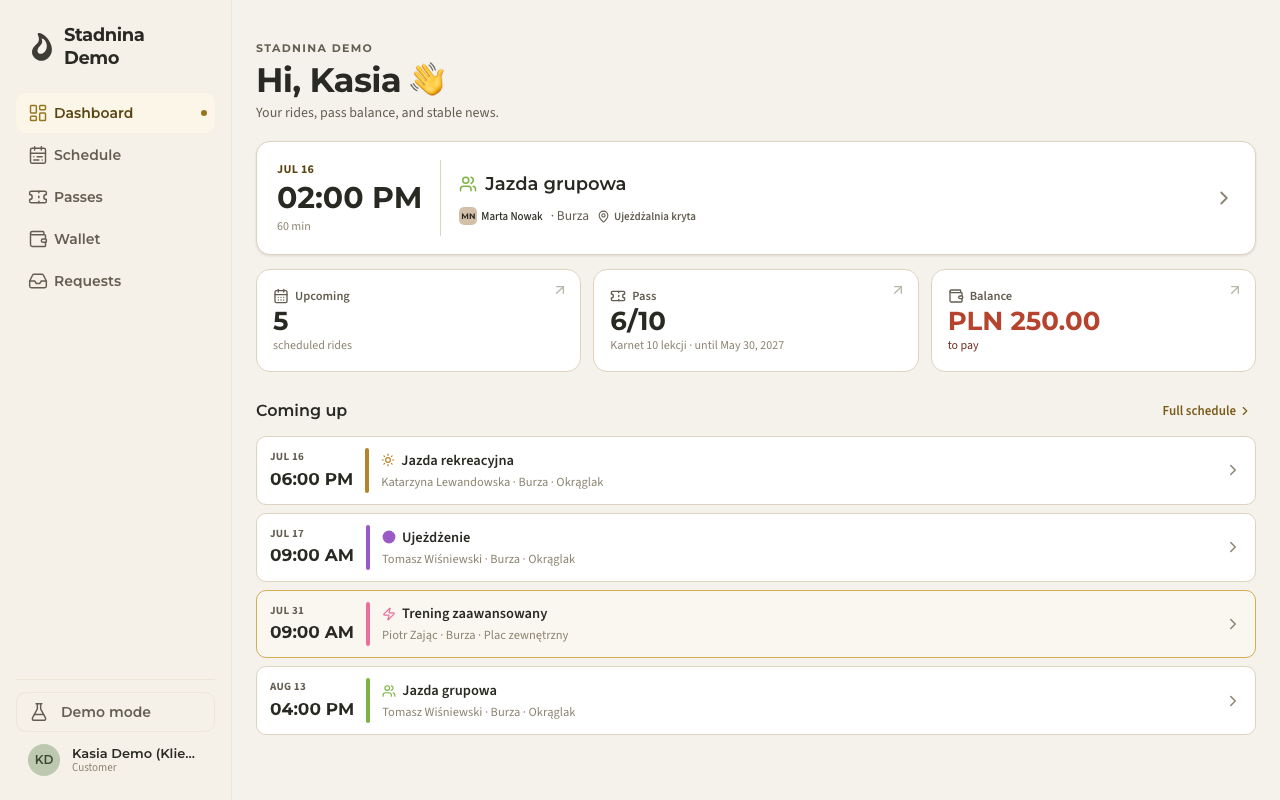
This is what you land on when you open your stable — a quick glance at your next ride, your passes and balance, and what's coming up. It's the home screen for riders (and for a parent booking on behalf of their child).
Your next ride
At the top, your soonest upcoming ride is shown as a large card: the day and time, how long it runs, the ride type, your instructor, your horse (or Horse: to be assigned if none is set yet), and the location. Tap it to see the full details, including how many riders have a spot and whether you can still cancel it yourself.
If you have nothing booked, you'll see You have no rides scheduled. with a button to either Request a ride or View schedule, depending on what your stable allows.
Your stats at a glance
Below your next ride, a row of small cards summarises your account. Upcoming (your scheduled ride count) is always there; the rest appear only when they apply to you:
- Pass — rides remaining out of the total, which ride type it covers (or Any ride type), and its expiry date.
- Balance — what you owe or the credit you have available, shown only if your stable tracks balances.
- Voucher — your voucher's remaining amount or ride count, and its valid-until date.
Tap any card to jump to that part of your account — Upcoming opens the schedule, Pass and Voucher open your wallet, Balance opens your wallet's balance view.
Coming up
Under your stats, Coming up lists your next few rides after the first one — same day/time layout, one line each. Tap Full schedule to see everything, or tap any ride to open its details.
Your stables
If you ride at more than one stable with Nose, a Your stables section lists them all, so you can see where else you're a member.
Good to know
- The first time you show up without a name on file, you're asked to fill in your Full name and, optionally, Phone — this is what lets stable staff know who's coming to ride. Only stable staff can see it, and it's used only for ride reminders and updates.
- If your name is already known but you have no phone on file, you may see a one-time reminder to add it — you can dismiss it with Later.
- If you're a parent with linked children, a rider switcher above the dashboard lets you pick You (own account) or one of your children to see their dashboard instead of yours. A banner shows Viewing: {name} while you're looking at a child's view, with a link back to your own account.
- A child's dashboard with no name on file shows a prompt to add their details from the Family section, rather than asking you to fill in your own name by mistake.