Booking & cancellation
Customer self-signup toggle and the self-cancel cutoff in hours.
ForAdmins
On this page
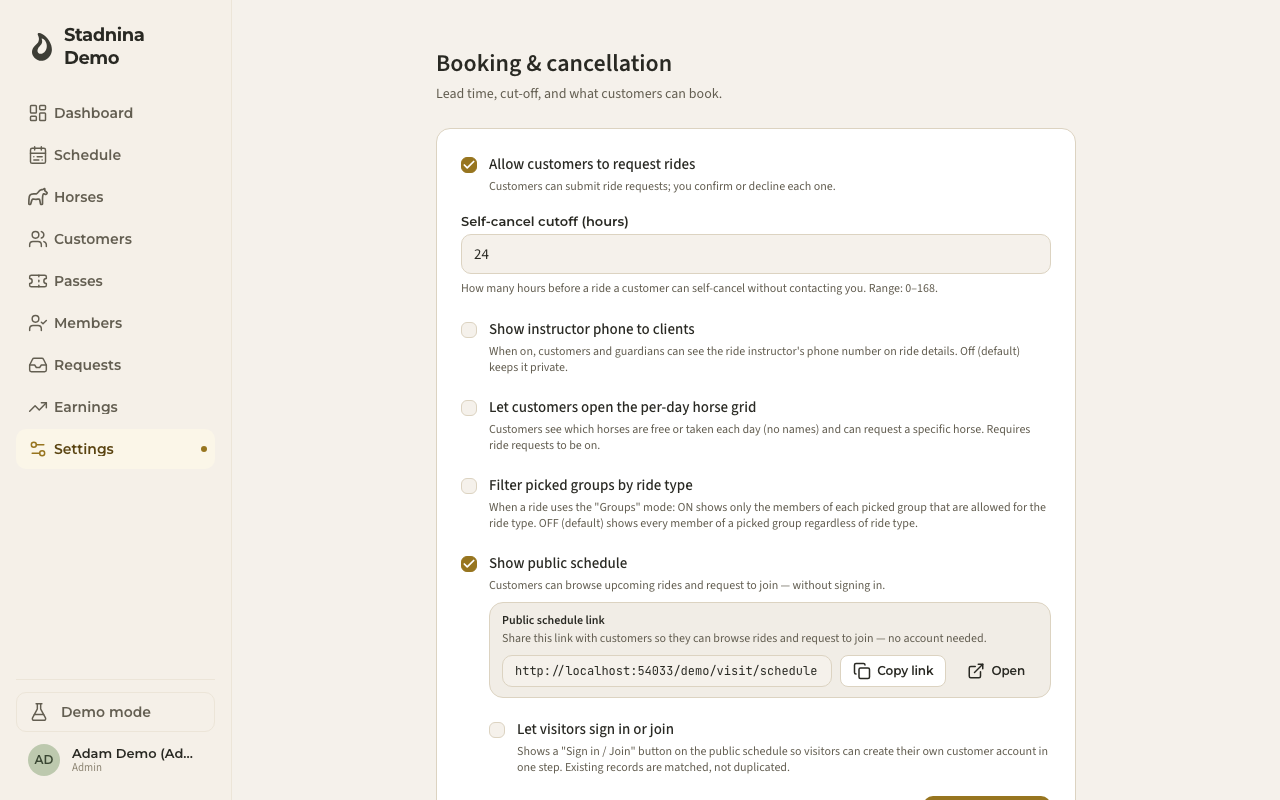
This page controls how customers can request rides, cancel their own spot, and — if you choose — sign up and browse your schedule without an account. It also includes a printable QR poster for your public schedule. Admins manage this page.
Letting customers request rides
Turn on Allow customers to request rides so customers can submit ride requests that you confirm or decline one by one.
Setting the self-cancel cutoff
Self-cancel cutoff (hours) sets how many hours before a ride a customer can cancel their own spot without contacting you. It accepts 0–168 hours. Inside the cutoff, they'll need to reach out to the stable directly.
Showing the instructor's phone number
Turn on Show instructor phone to clients to let customers and guardians see the ride instructor's phone number on ride details. It's off by default, keeping the number private.
Letting customers see the day view
Turn on Let customers open the per-day horse grid so customers can see which horses are free or taken on a given day (without names) and request a specific horse. This needs ride requests to be turned on first.
Filtering horse groups by ride type
Filter picked groups by ride type changes how the "Groups" horse-picker mode behaves when creating a ride. On, it only shows group members allowed for that ride type. Off (the default), it shows every member of a picked group regardless of ride type.
Showing a public schedule
Turn on Show public schedule to let anyone browse your upcoming rides and request to join, without signing in.
Once the public schedule is on, you can also turn on Let visitors sign in or join — this adds a "Sign in / Join" button to the public schedule so a visitor can create their own customer account in one step. Matching existing customer records are reused rather than duplicated. This option is disabled until the public schedule itself is on.
QR poster
The QR poster section generates a printable A4 poster with a QR code linking to your public schedule. Pick a template, then Download PNG or Download PDF. The code only works once Show public schedule is turned on above.
Good to know
- Turning off ride requests while requests are still pending doesn't cancel them — they stay in your inbox until you act, and you'll be asked to confirm before the setting saves.
- The "Let visitors sign in or join" button only appears once the public schedule is on — there's nowhere to show it otherwise.
Related
- Getting your riders in — the four ways a rider joins your stable, and what they see.
- Booking rides — the customer side of ride requests.
- Requests — where you confirm or decline incoming requests.
- Hours & calendar — opening hours and the schedule grid.
- Balance and online payments — customer wallet, deferred-payment limit, and Stripe top-ups.