Passes
Sell ride passes, track who's used what, and see it all in one list — passes and vouchers side by side.
ForAdminsInstructors
On this page
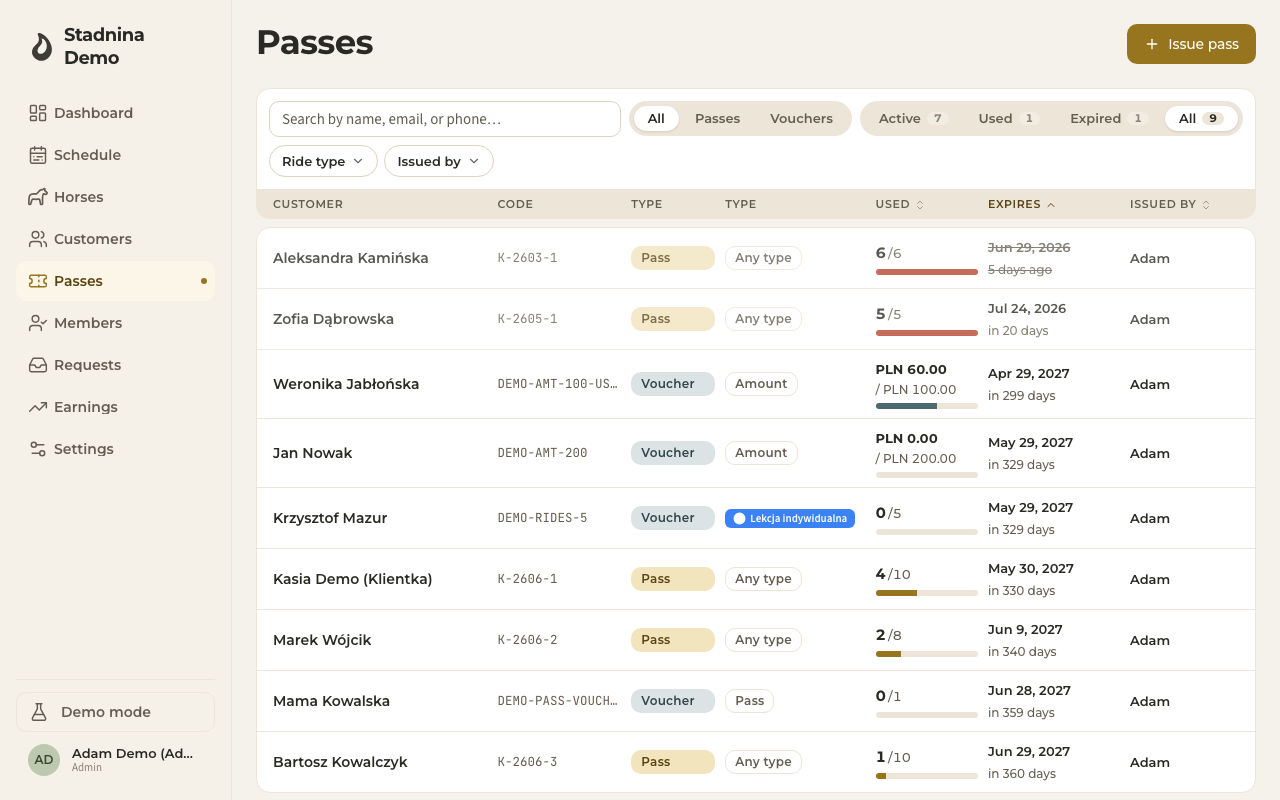
The Passes page lists every pass and voucher you've sold — who holds it, how much of it is used, and when it expires. Admins and instructors can open it; it stays hidden from riders, who see their own passes in their wallet instead.
This page covers passes. For vouchers (gift cards, ride bundles, or a voucher redeemable for a pass), see Vouchers — both live in this same list.
Finding a pass
- Search by customer name, email, or phone in the box at the top.
- Switch between All, Passes, and Vouchers with the entity tabs.
- Switch between Active, Used, Expired, and All with the status tabs — each shows a live count.
- Filter by Ride type or Issued by using the dropdowns.
- Sort by clicking a column header: Used, Expires, or Issued by.
Reading the list
Each row shows:
- Customer — who holds the pass.
- Code — the pass's short reference code, shown under the customer's name.
- Type — Pass or Voucher.
- Kind — the ride type the pass is restricted to, or Any type if it covers every ride type.
- Used — a bar showing rides used out of the total.
- Expires — the expiry date, with how many days away it is.
- Issued by — which admin or instructor sold it.
A pass close to expiring (within 7 days) or fully used is visually flagged in the row.
Selling a pass
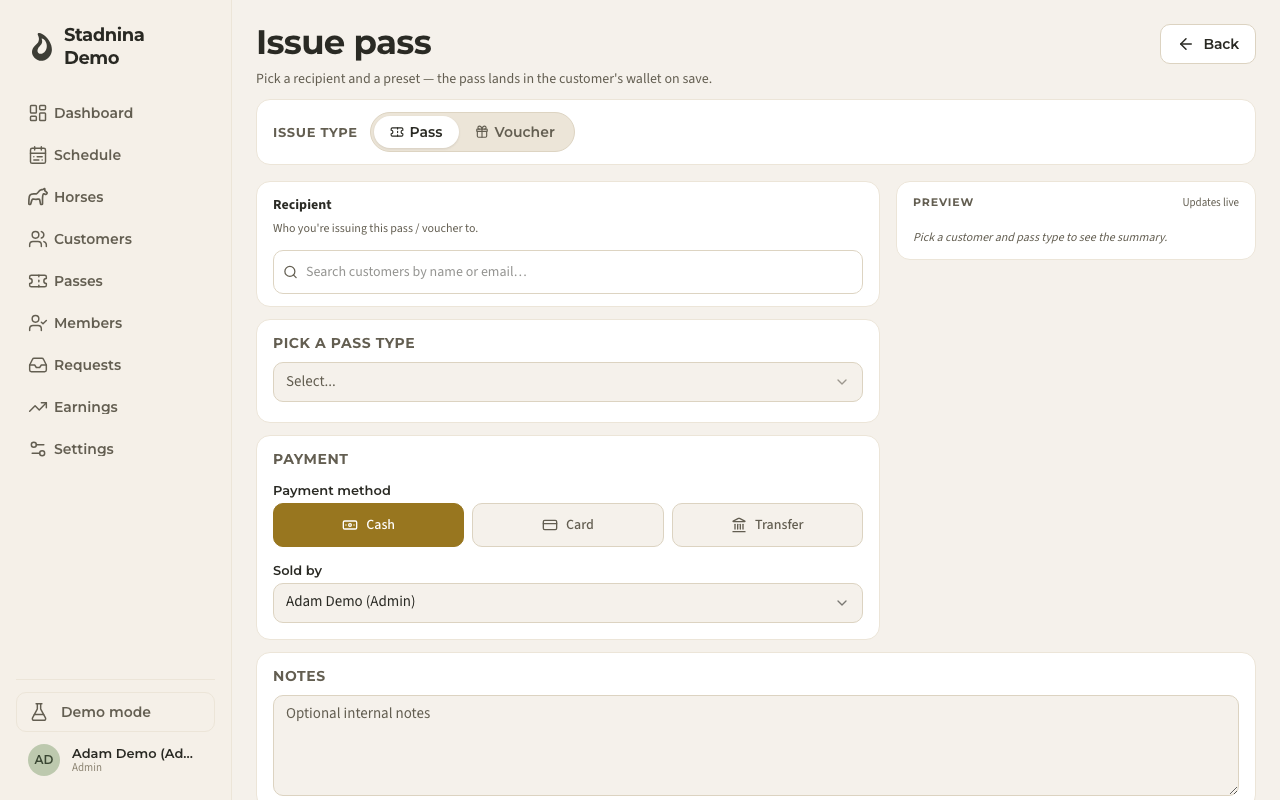
- Click Issue pass at the top of the page.
- Pick the customer the pass is for. Sharing is allowed if your stable's settings permit it — use + Add to bring in co-holders, up to the stable's holder limit.
- Pick a pass type from the list of pass types your stable has set up, or choose Custom pass to set the ride type, ride count, and price yourself.
- With a pass type selected, the price is filled in automatically. Click Add discount to adjust it by percentage or by a final amount.
- With a custom pass, you choose the ride type (or Any ride type), the number of rides, and the price directly. You can also override the default expiry date.
- Record how the sale was paid under Sale method, and — if you're an admin — who sold it (defaults to you).
- Check the live preview on the right, then click Issue pass.
If your stable hasn't set up any pass types yet, the page tells you so and links to Settings, where an admin can add one. See Pass & voucher setup for how pass types, discounts, and sharing rules are configured.
The pass detail panel
Click any pass row to open its details on the right.
- Overview — rides remaining, rides used, expiry date, and the pass's value.
- Usage — a timeline of every ride the pass paid for, including rides paid by a co-holder or borrowed from another pass.
- Payments — visible to admins and instructors.
From here you can:
- Edit the pass — its rides, price, or sale details (rides can't drop below what's already been used).
- Manage Holders — add a co-holder if sharing is allowed and the stable's holder limit isn't reached yet, or remove one. A holder who has already used a ride on the pass can't be removed, and the sole remaining holder can't be removed either — cancel the pass instead. Removing the primary holder promotes the next one.
- Refund the pass, with an optional reason.
- Cancel the pass (only while it's still active), with an optional reason.
- Issue next — jump straight to issuing another pass for the same customer.
Redeeming a pass
A pass isn't redeemed from this page. It's applied automatically when a rider checks out of a ride — the nearest-to-expiry eligible pass is offered first. See Ride checkout for how a ride gets paid.
Good to know
- Sharing a pass and how many holders it can have are controlled by your stable's settings — see Pass & voucher setup.
- Whether instructors can issue custom passes (not just preset types) is also a stable setting.
- The Pass utilisation report (reachable from Settings, admin-only) lets you filter by status, type, and date range, and export the list as CSV — useful for spotting under-used or soon-to-expire passes across the whole stable.
- Changing a pass's holders never affects rides that have already been settled — it only changes who can use the rides that are left.
Related
- Vouchers — gift cards, ride bundles, and pass vouchers.
- Ride checkout — how a pass actually pays for a ride.
- Pass & voucher setup — configure pass types, discounts, and sharing rules.
- Earnings — how a pass sale shows up in an instructor's settlement.
- Wallet & passes — what a rider sees.