The dashboard
The home screen staff land on inside a stable — key figures, a revenue trend, and the day-to-day operational widgets, all yours to rearrange.
ForAdminsInstructors
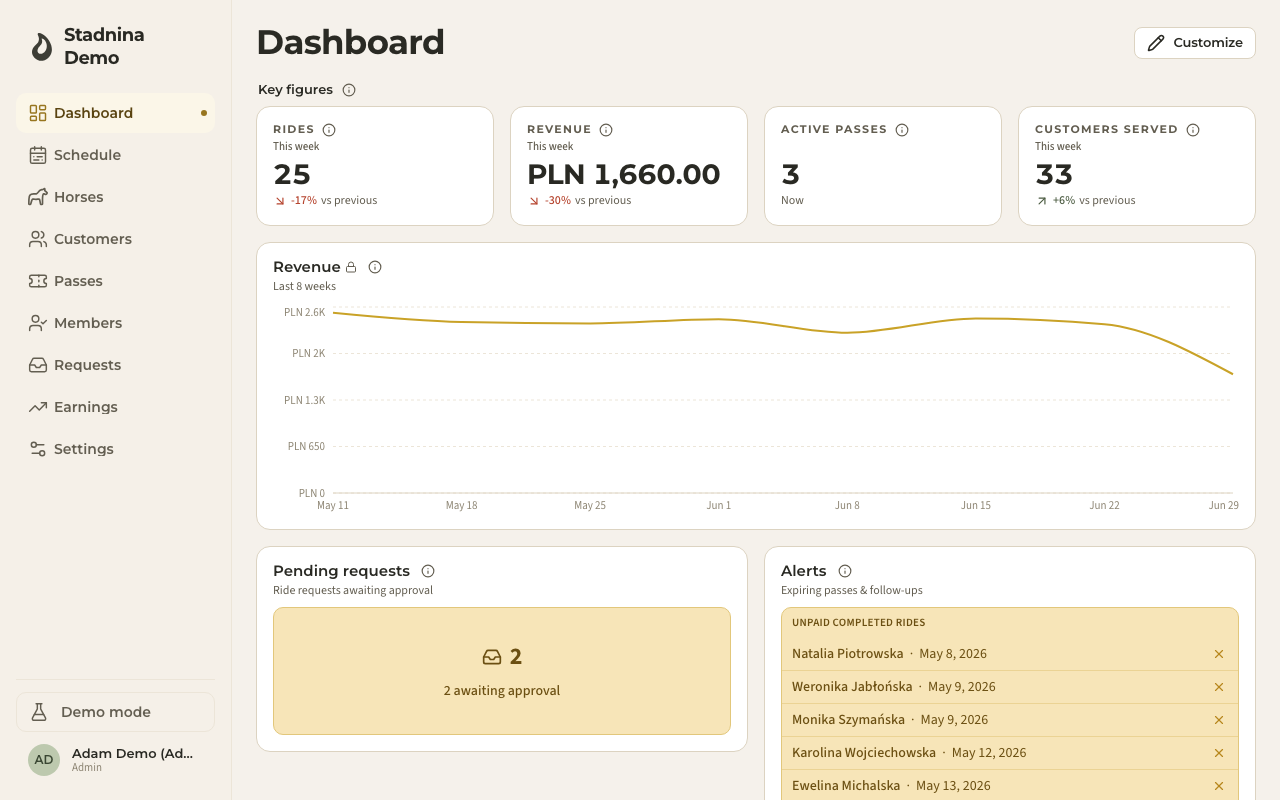
The Dashboard is the home screen you land on when you enter your stable as an admin — a wall of widgets giving you today's headline numbers, a revenue trend, and the operational things that need your attention. It's yours to rearrange: nothing here is fixed.
What's on it
A fresh stable starts with this set of widgets, which you can keep, remove, or replace:
- Key figures — a row of headline numbers for this week: rides, revenue, active passes, and customers served.
- Revenue trend — a chart of revenue over the last 8 weeks.
- Pending requests — ride requests from customers waiting for your approval.
- Alerts — three things worth knowing about: passes expiring within 7 days, instructors with no rides this week, and ride participants who are still unpaid more than 7 days after their ride.
- Instructor payouts — what each instructor is owed so far this month, with a Mark paid button once you've settled up.
- Cash reconciliation — cash handled by each instructor, day by day.
- Last week's settlement — a summary of how last week closed out.
Rearranging your dashboard
To change what you see:
- Click Customize in the top-right corner.
- In edit mode you can:
- Add widget to pick a new one from the catalogue — key figures, trends, breakdowns, rankings, and more, built from whatever you want to measure (rides, revenue, hours, passes, vouchers, and more).
- Drag any widget by its handle to reorder it.
- Toggle a widget between full and half width, duplicate it, or remove it.
- Configure a widget's own measure, chart type, and time period.
- When you're happy, click Save to keep this layout for yourself, or Save as stable default so every admin starts from it. Reset to default brings back the original set at any time, and Cancel discards your changes.
Your dashboard can hold up to a set number of widgets — the toolbar shows how many you're using.
Good to know
- Widgets involving money (revenue, payouts, cash, sales) are only ever visible to admins, even if a widget layout is shared.
- Each widget can use its own time period — this week, this month, last year, and so on — independent of the others.
- Reset to stable default always brings back a working dashboard, so it's safe to experiment with your layout.
Related
- Create a stable — where this dashboard first appears, right after setup.
- Your dashboard — the different home screen riders and families see.
- Week and day views — where the day-to-day scheduling work happens.