People and roles
Everyone at your stable — riders, staff, and helpers — with activity, passes, balance, and family, plus roles, status, and invitations.
ForAdminsInstructors
On this page
The People page lists everyone connected to your stable — the riders who use it and the staff who run it. Each person's activity, passes, balance, and family sit one click away, alongside their roles, status, and invitations. Admins and instructors can open it.
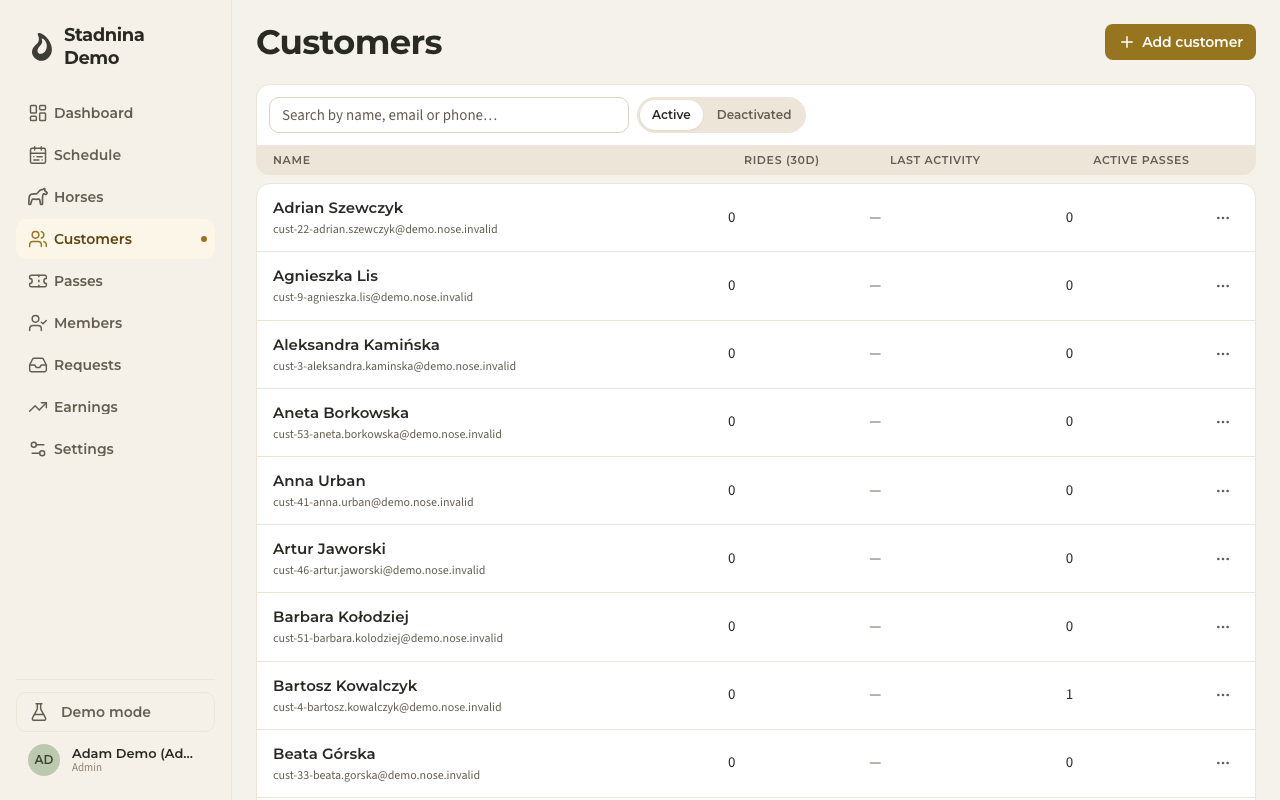
Finding someone
- Search by name, email, or phone in the box at the top.
- Filter by role using the tabs next to the search box — All, Owner, Instructors, Helpers, Clients, and Horse owners each show a live count.
- Switch between Active and Deactivated people with the toggle beside the search box.
Reading the row
Each row shows:
- Name and contact — the person, with their email underneath.
- Role — one chip per role a person holds; a person can hold more than one. A rider with no stable membership yet (a walk-in, or someone who's only ever been added to a booking) shows as not a member instead of a role.
- Rides (30d) — how many rides they've had in the last 30 days.
- Last activity — when they were last active.
- Active passes — how many valid passes they currently hold.
Switching to the Deactivated tab replaces the last three columns with when they were deactivated, and, for admins, a Reactivate action.
Roles and who may change them
- Admin (Owner) — full control: settings, billing, money, and managing every other person's roles.
- Instructor — runs the schedule, rides, passes, vouchers, and payments, and can grant the customer, horse owner, and helper roles — but not admin or instructor.
- Helper — a free, limited role. Can see the schedule and the horses list, and update a horse's welfare status (for example marking it resting), but can't touch money, bookings, or settings.
- Customer and Horse owner — the people who ride and own horses, managed day to day from this same page.
A person can hold more than one role at once — for example an instructor who is also a horse owner. Open a person's panel and go to the Membership tab to change their roles: admins can grant any role, instructors can grant customer, horse owner, and helper. Nobody can remove their own admin role, and a stable must always keep at least one admin.
Status and deactivation
Open a person's ⋯ menu and choose Deactivate. They immediately lose access to the stable; their history stays intact, and an admin can Reactivate them later from the Deactivated tab. You can't deactivate your own account. Deactivating someone doesn't delete anything — it refunds any pass credit and just removes their access.
Invitations
- Click Invite member in the top-right corner.
- Enter their email. Admins can invite any role; instructors can only invite customer, horse owner, or helper.
- Optionally add their full name and phone — this saves them a step when they accept.
- Click Send invitation. They get an email with a one-click sign-in link that adds them to your stable.
While an invitation is waiting to be accepted, it shows in a Pending invitations section above the list, where you can resend it or (admins only) cancel it.
Inviting is for people who'll run or help run the stable, or for a proper one-click sign-in link for a rider. For a rider you're just adding a record for, without waiting on an invitation, use Add customer instead (below) — see Getting your riders in for all four routes.
Adding a customer
Use Add customer in the top-right corner to create a record with a name and, optionally, contact details.
The email address is what gives someone an account. Add one and Nose emails them to say their account is ready, so they can sign in; leave it out and you get a walk-in record that can't sign in until you add an address later.
The person panel
Click a person to open their panel:
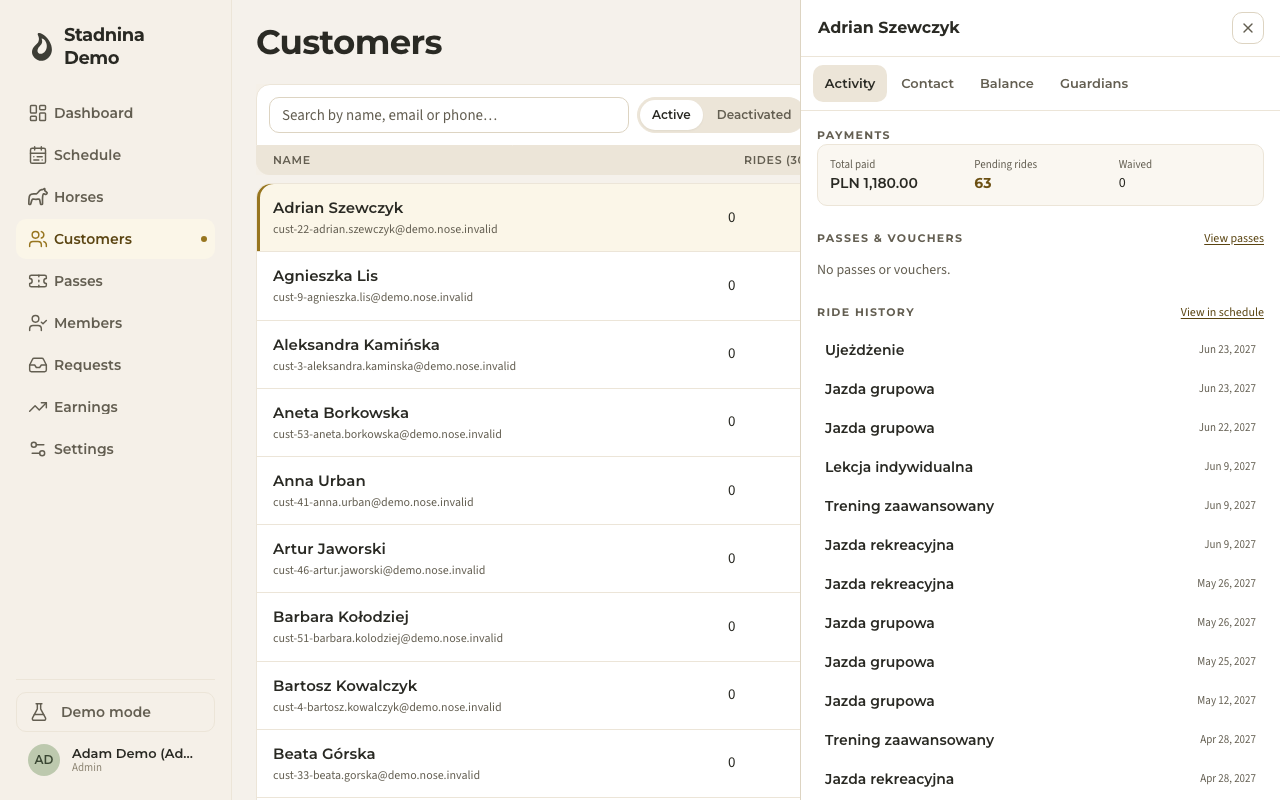
- Activity — payments at a glance (total paid, pending rides, waived), the passes and vouchers they hold, and their ride history.
- Contact — name, email, and phone, plus whether they've claimed their own account.
- Membership — their roles (with the picker described above), status, and join date.
- Balance — the person's running balance: top-ups, ride charges, settlements, and refunds, newest first, with a CSV export.
- Guardians — for a child or dependent rider, the parent or guardian accounts linked to them.
Good to know
- A person can be both a customer and a horse owner — the same record links the two.
- Children don't need their own email — a parent can add them under their own account; see Family accounts.
- If the same person was added twice (once by you, once when they signed up), you can merge the two records so their history, passes, and balance end up in one place.
- Changing someone's email sends a fresh sign-in link to the new address.
Related
- Getting your riders in — every way a rider joins your stable, and what they see.
- Accepting an invitation — the other side of this page: what the person you invite sees and does.
- Horses — where a customer appears as a horse's owner.
- Requests — the booking-requests inbox instructors and admins work from.